Tutorial · SMS
Track SMS delivery: status API, reports and webhooks
Three ways to know what happened to an API SMS: poll one job, pull a daily report per key, or receive signed webhooks as delivery reports arrive.
Pixabits team · · 9 min read
On this page
Every SMS sent with POST /api/v1/sms/send returns a job_id. Operators report delivery seconds or minutes later. This tutorial covers the three ways to follow that up.
| Method | Use it for |
|---|---|
| Status API | Checking one message, for example while testing. |
| Reports API | Daily totals per API key for dashboards and reconciliation. |
| Webhooks | Updating your own system as each delivery report arrives. Best for production. |
1. Status of one message
GET /api/v1/sms/status/{job_id} with api_key as a query parameter. The job moves from PENDING to SUBMITTED, then to DELIVERED, FAILED or EXPIRED. The full response is in Send your first SMS.
curl "https://pixabits.ai/api/v1/sms/status/sms_job_3f9a1c2b7d?api_key=YOUR_API_KEY"2. Daily report per API key
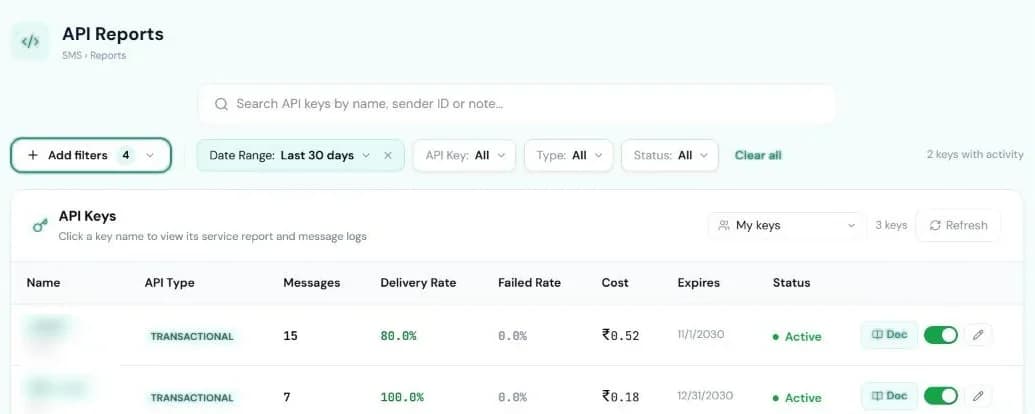
GET /api/v1/sms/reports returns a summary and a day-by-day breakdown of the messages sent with the key you call it with. from and to are dates (YYYY-MM-DD); the default is the last 30 days.
curl "https://pixabits.ai/api/v1/sms/reports?api_key=YOUR_API_KEY&from=2026-09-01&to=2026-09-30"{
"success": true,
"summary": { "total": 120, "submitted": 2, "delivered": 114, "failed": 4, "pending": 0 },
"daily": [
{ "date": "2026-09-01", "total": 6, "submitted": 0, "delivered": 6, "failed": 0, "pending": 0 },
…
],
"dateRange": { "from": "2026-09-01", "to": "2026-09-30" }
}failed counts FAILED, EXPIRED and UNKNOWN jobs. The same numbers per key are in the console under SMS → Reports → API.
3. Delivery webhooks
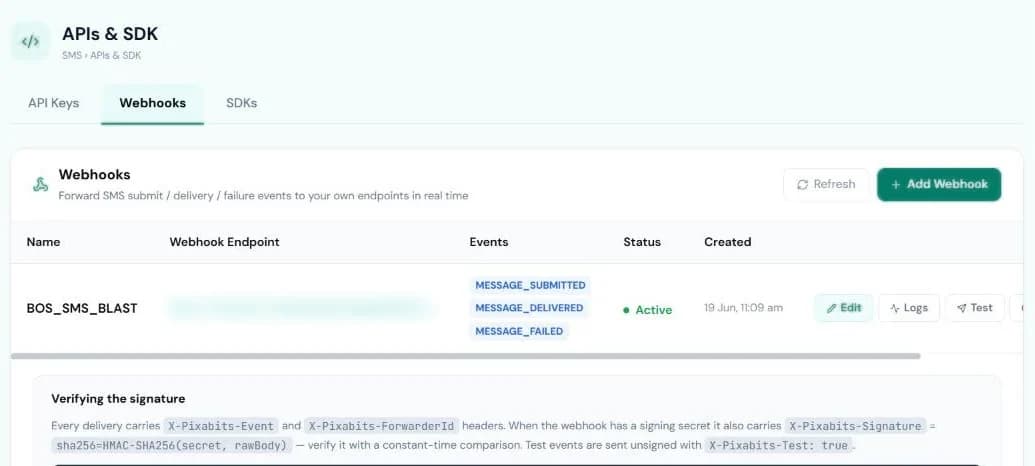
Register an HTTPS endpoint and Pixabits POSTs an event to it when a message is submitted, delivered or fails. You can register it in the console under SMS → APIs & SDK → Webhooks, or with the API:
curl -X POST https://pixabits.ai/api/v1/sms/webhooks \
  -H "Content-Type: application/json" \
  -d '{
    "api_key": "YOUR_API_KEY",
    "url": "https://example.com/webhooks/sms",
    "events": ["MESSAGE_DELIVERED", "MESSAGE_FAILED"],
    "secret": "a-long-random-string",
    "name": "Production listener"
}'HTTP/1.1 201 Created
{
"success": true,
"webhook": {
"id": "…",
"name": "Production listener",
"url": "https://example.com/webhooks/sms",
"events": ["MESSAGE_DELIVERED", "MESSAGE_FAILED"],
"isEnabled": true
}
}urlmust start withhttps://and be at most 500 characters.events: any ofMESSAGE_SUBMITTED,MESSAGE_DELIVERED,MESSAGE_FAILED,CAMPAIGN_DELIVERED. Leave it out, send[]or["*"]for all events.- Registering the same URL again updates it instead of adding a copy. Up to 5 webhooks per account.
GET /api/v1/sms/webhooks?api_key=…lists them. The secret is never returned.
What you receive
POST /webhooks/sms
Content-Type: application/json
X-Pixabits-Event: MESSAGE_DELIVERED
X-Pixabits-ForwarderId: …
X-Pixabits-AttemptNo: 1
X-Pixabits-Signature: sha256=…

{
  "event": "MESSAGE_DELIVERED",
  "messageId": "sms_job_3f9a1c2b7d",
  "orgId": "…",
  "toNumber": "919876543210",
  "status": "delivered",
  "errorCode": null
}- For API sends,
messageIdis thejob_idyou got back from the send call. Match on it. statusissubmitted,deliveredorfailed. Failures carry the operator'serrorCodewhen there is one.MESSAGE_SUBMITTEDevents also carrysenderIdandsubmittedAt.
Verify the signature
If you set a secret, every delivery has X-Pixabits-Signature: sha256=<hex>, an HMAC-SHA256 of the raw request body with your secret. Compute it yourself and compare in constant time:
import crypto from 'node:crypto';

// rawBody: the request body exactly as received (before JSON.parse).
export function isFromPixabits(rawBody, signatureHeader, secret) {
  const expected = 'sha256=' + crypto.createHmac('sha256', secret).update(rawBody).digest('hex');
  const a = Buffer.from(signatureHeader ?? '');
  const b = Buffer.from(expected);
  return a.length === b.length && crypto.timingSafeEqual(a, b);
}
Test events sent from the console are unsigned and carry X-Pixabits-Test: true.
Retries
- Any 2xx response counts as received. Reply quickly: Pixabits waits up to 8 seconds.
- A failed delivery is retried up to 3 attempts in total: straight away, then about 2 minutes later, then about 10 minutes after that. Retries run on a scheduled job, so timings can drift a little.
X-Pixabits-AttemptNotells you which attempt you are seeing. Events can arrive more than once, so make your handler idempotent onmessageIdandevent.- The console shows each webhook's recent delivery attempts under Logs.